
HP ProLiant ML570 Generation 2 Server Setup and Installation Guide

System Battery
F-2 HP ProLiant ML570 Generation 2 Server Setup and Installation Guide
HP CONFIDENTIAL
Writer: Wendy Wing File Name: o-appf System Battery.doc
Codename: Time Bandit Part Number: 223960-002 Last Saved On: 8/22/02 11:25 AM
2. Remove the access panel. Refer to “Removing the Access Panel” in Chapter 3,
“Installing Hardware Options.”
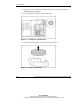
3. Locate the battery connector on the system board.
Figure F-1: Locating the system battery
4. Remove the existing battery and note which side is positive.
Figure F-2: Removing the battery