
FW 07.00.00/HAFM SW 08.06.00 McDATA Intrepid 6064 Director Installation and Service Manual (620-000108-920, April 2005)



2
Task 8: Configure the Director at the Element Manager Application
2-51
Installation Tasks
Set Director to Periodically Synchronize Date and Time
To set the director to periodically synchronize date and time with the
SAN management application:
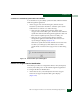
• At the Configure Date and Time dialog box, click the Periodic
Date/Time Synchronization check box to select the option (check
mark in the box). Perform one of the following:
— Click Activate to enable synchronization and close the
Configure Date and Time dialog box. The director date and time
synchronize with the SAN management application date and
time at the next update period (at least once daily). Or
— Click Sync Now to synchronize the director and SAN
management application immediately. The Date and Time
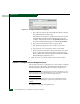
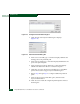
Synced dialog box displays (Figure 2-41).
Click OK to synchronize the date and time and close the Date
and Time Synced dialog box, then click Activate to enable
synchronization and close the Configure Date and Time dialog
box.
Figure 2-41 Date and Time Synced Dialog Box
Subtask B: Configure Director Identification
Perform this procedure to configure the director name, description,
location, and contact person for the SAN management application.
To configure the director identification:
1. At the Hardware View, select Identification from the Configure
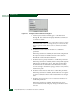
menu. The Configure Identification dialog box displays
(Figure 2-42).