
FW 07.00.00/HAFM SW 08.06.00 McDATA Intrepid 6064 Director Installation and Service Manual (620-000108-920, April 2005)



2
2-52
Intrepid® 6064 Director Installation and Service Manual
Installation Tasks
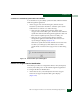
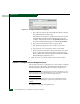
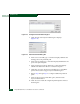
Figure 2-42 Configure Identification Dialog Box
a. Type a director name in the Name field. Each director should
be configured with a unique name.
If the director is installed on a public LAN, the name should
reflect the director Ethernet network DNS host name. For
example, if the DNS host name is intrepid6064.mcdata.com,
the name entered in this dialog box should be intrepid6064.
b. Type a director description in the Description field.
c. Type the director physical location in the Location field.
d. Type the name of a contact person in the Contact field.
e. Click Set Name as Nickname to add a check mark to the check
box to use the name in the Name field as a nickname for the
director WWN. The nickname displays instead of the WWN in
Element Manager application Views.
2. Click Activate to save the information and close the window.
Subtask C: Configure Director Management Style
Perform this procedure to set the director to open systems or FICON
management style. This setting only affects the management style
used to manage the director and does not affect port operation.
NOTE: OSI devices can communicate with each other if the director is set to
FICON management style, and FICON devices can communicate with each
other if the director is set to open systems management style.
NOTE: If the FICON management server feature is enabled, the default
management style is FICON. Open systems management style cannot be
enabled.
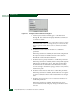
To configure the director management style: