
FW 07.00.00/HAFM SW 08.06.00 McDATA Intrepid 6064 Director Installation and Service Manual (620-000108-920, April 2005)



2
Task 8: Configure the Director at the Element Manager Application
2-53
Installation Tasks
1. Ensure the director is set offline (Set the Director Online or Offline
on page 4-43).
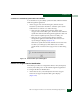
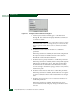
2. At the Hardware View for the selected director, select Management
Style from the Product menu. The Configure Management Style
menu displays.
3. Select the management style.
• Select the Open Systems radio button for (non-FICON) Fibre
channel environments.
• Select the FICON radio button when attaching an IBM S/390
Parallel Enterprise or zSeries server to the director and
implementing inband director management through a FICON
channel.
NOTE: If director firmware level is below 6.0 and the FICON
Management Server feature is enabled, the default management style
will be FICON.
NOTE: The management style cannot be changed to open systems
with the FICON Management Server feature enabled.
4. Click Activate to save the selection and close the window.
Subtask D: Configure Director Parameters
Perform this procedure to configure director preferred domain ID,
insistent domain ID, rerouting delay, and domain RSCNs.
To configure director parameters:
1. Ensure the director is set offline (Set the Director Online or Offline
on page 4-43).
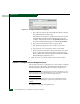
2. At the Hardware View for the selected director, click Configure at
top of the view. Select Operating Parameters, then select Switch
Parameters. The Configure Switch Parameters dialog box displays
(Figure 2-43).