
FW 07.00.00/HAFM SW 08.06.00 McDATA Intrepid 6064 Director Installation and Service Manual (620-000108-920, April 2005)



2
2-54
Intrepid® 6064 Director Installation and Service Manual
Installation Tasks
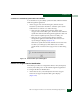
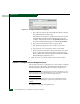
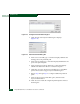
Figure 2-43 Configure Switch Parameters Dialog Box
a. At the Preferred Domain ID field, type a value between 1
through 31. The domain ID uniquely identifies each director
or switch in a fabric.
NOTE: All fabric-attached directors and switches must have unique
domain IDs. If the value is not unique, the E_Port connection to the
director segments and the director cannot communicate with the
fabric.
b. Click the Insistent Domain ID check box to enable this
parameter.
When the parameter is enabled, the domain ID configured in
the Preferred Domain ID field becomes the active domain
identification when the fabric initializes.
c. Click the Rerouting Delay check box to enable this parameter.
When the parameter is enabled, traffic is delayed through the
fabric by the specified E_D_TOV. This delay ensures Fibre
Channel frames are delivered to their destination in order,
even if a change to the fabric topology creates a new (shorter)
transmission path.
d. Click the Domain RSCNs check box to enable this parameter.
When the parameter is enabled, attached devices can register
to receive notification when another attached device changes
state.
e. Click the Suppress RSCNs on zone set activations check box to
enable this parameter.
When the parameter is enabled, attached devices do not
receive notification following any change to the fabric active
zone set.