
FW 07.00.00/HAFM SW 08.06.00 McDATA Intrepid 6064 Director Installation and Service Manual (620-000108-920, April 2005)



2
Task 8: Configure the Director at the Element Manager Application
2-55
Installation Tasks
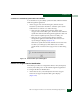
3. Click Activate to save the information and close the dialog box.
4. Set the director online (Set the Director Online or Offline on
page 4-43).
Subtask E: Configure Fabric Parameters
Perform this procedure to configure fabric parameters, including
BB_Credit, R_A_TOV, E_D_TOV, and switch priority.
To configure fabric parameters:
1. Ensure the director is set offline (Set the Director Online or Offline
on page 4-43).
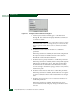
2. At the Hardware View for the selected director, select Operating
Parameters, then Fabric Parameters from the Configure menu. The
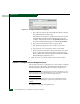
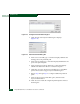
Configure Fabric Parameters dialog box displays (Figure 2-44).
Figure 2-44 Configure Fabric Parameters Dialog Box
a. At the BB_Credit field, type a value between 1 and 60 buffers.
The default is 16.
b. At the R_A_TOV field, type a value between 10 and 1200
tenths of a second (one through 120 seconds). The default is
100.
NOTE: All fabric-attached directors and switches must be set to the
same R_A_TOV. If the value is not compatible, the E_Port connection
to the director segments and the director cannot communicate with
the fabric. In addition, the R_A_TOV must be greater than the
E_D_TOV.
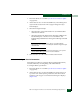
c. At the E_D_TOV field, type a value between 2 and 600 tenths
of a second (0.2 through 60 seconds). The default is 20.