
FW 07.00.00/HAFM SW 08.06.00 McDATA Intrepid 6064 Director Installation and Service Manual (620-000108-920, April 2005)



2
2-56
Intrepid® 6064 Director Installation and Service Manual
Installation Tasks
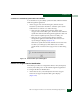
NOTE: All fabric-attached directors and switches must be set to the
same E_D_TOV. If the value is not compatible, the E_Port connection
to the director segments and the director cannot communicate with
the fabric. In addition, the E_D_TOV must be less than the R_A_TOV.
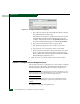
d. Set the director priority from the Switch Priority drop-down
list. Select Principal, Never Principal, or Default (the default is
Default.
The switch priority value designates the fabric principal
switch. The principal switch is assigned a priority of 1 and
controls the allocation and distribution of domain IDs for all
fabric directors and switches (including itself).
Principal is the highest priority setting, Default is the next
highest, and Never Principal is the lowest priority setting. The
setting Never Principal means that the switch is incapable of
becoming a principal switch. If all switches are set to Principal
or Default, the switch with the highest priority and the lowest
WWN becomes the principal switch.
At least one switch in a multiswitch fabric must be set as
Principal or Default. If all switches are set to Never Principal, all
ISLs segment.
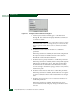
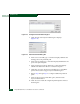
e. Set the director operating mode from the Interop Mode
drop-down list. This setting only affects the mode used to
manage the director and does not affect port operation. Select
one of the following options:
• McDATA Fabric 1.0 - Select this option if the director is
fabric-attached only to other McDATA directors or
switches operating in McDATA fabric mode.
• Open Fabric 1.0 - Select this option (default) for managing
heterogeneous fabrics and if the director is fabric-attached
to other McDATA directors or switches and open-fabric
compliant switches produced by other OEMs.
NOTE: When Open Fabric 1.0 is selected, the default zone is
disabled, and you have to activate the default zone or enable the
active zone set
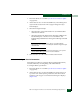
3. Click Activate to save the information and close the dialog box.