
FW 07.00.00/HAFM SW 08.06.00 McDATA Intrepid 6064 Director Installation and Service Manual (620-000108-920, April 2005)



2
Task 8: Configure the Director at the Element Manager Application
2-57
Installation Tasks
4. Set the director online (Set the Director Online or Offline on
page 4-43).
Subtask F: Configure Preferred Paths
The preferred path feature allows a user to specify and configure one
or more ISL data paths between multiple directors or switches in a
fabric. Each participating director or switch must be configured as
part of a desired path. The following rules apply when configuring a
preferred path:
• The switch domain ID must be set to Insistent (Subtask D:
Configure Director Parameters on page 2-53.
• Domain IDs range between 1 through 31.
• Source and exit port numbers are limited to the range of ports
available on the director.
• For each source port, only one path is defined to each destination
domain ID.
NOTE: Activating a preferred path can result in receipt of out-of-order
frames (OOOFs) if the preferred path differs from the current path, input/
output (I/O) is active from the source port, and congestions is present on the
current path.
To configure one or more preferred paths for the director:
1. Ensure the preferred path PFE key is installed and configured
(Subtask D: Configure Feature Key on page 2-45).
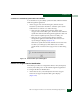
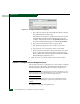
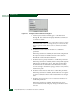
2. At the Hardware View, select Preferred Path from the Configure
menu. The Configure Preferred Paths dialog box displays
(Figure 2-45).