
FW 07.00.00/HAFM SW 08.06.00 McDATA Intrepid 6064 Director Installation and Service Manual (620-000108-920, April 2005)



2
2-58
Intrepid® 6064 Director Installation and Service Manual
Installation Tasks
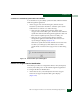
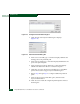
Figure 2-45 Configure Preferred Paths Dialog Box
3. Click Add. The Add Preferred Path dialog box displays
(Figure 2-46).
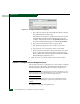
Figure 2-46 Add Preferred Path Dialog Box
4. At the Source Port field, type a value that uniquely identifies the
starting port for the preferred path.
5. At the Exit Port field, type a value that uniquely identifies the exit
port for the preferred path.
6. At the Destination Domain ID field, type a value that uniquely
identifies the destination director or switch in the path.
7. Click OK to close the Add Preferred Path dialog box and add the
path to the list at the Configure Preferred Paths dialog box.
8. Repeat step 3 through step 7 to configure additional preferred
paths.
9. At the Configure Preferred Paths dialog box, click the Enable
Preferred Path check box.
10. Click Activate to enable all configured preferred paths and close
the dialog box.