
FW 07.00.00/HAFM SW 08.06.00 McDATA Intrepid 6064 Director Installation and Service Manual (620-000108-920, April 2005)



2
Task 8: Configure the Director at the Element Manager Application
2-61
Installation Tasks
and removed from the list to prohibit element connection.
Devices are allowed to connect to any F_Port or FL_Port
without restriction.
• Restrict F_Ports - Select this button to restrict connections
from specific devices to director F_Ports or FL_Ports. WWNs
can be added to the membership list to allow device
connection and removed from the list to prohibit device
connection. Fabric directors and switches are allowed to
connect to any E_Port without restriction.
• Restrict All - Select this button to restrict connections from
specific devices to director F_Ports or FL_Ports and fabric
elements to director E_Ports. WWNs can be added to the
membership list to allow connection and removed from the
list to prohibit connection.
5. Click Activate to enable the changes and close the Switch Binding -
Change State dialog box.
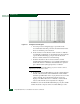
Background: Membership List
If the director is online, binding populates a membership list at the
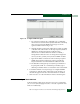
Switch Binding - Membership List dialog box displays (Figure 2-48)
with WWNs of devices connected to the director. The list is modified
by the connection policy set in the Switch Binding - Change State dialog
box (Figure 2-47).
Figure 2-48 Switch Binding - Membership List Dialog Box