
FW 07.00.00/HAFM SW 08.06.00 McDATA Intrepid 6064 Director Installation and Service Manual (620-000108-920, April 2005)



2
2-62
Intrepid® 6064 Director Installation and Service Manual
Installation Tasks
When the switch binding feature is installed but not enabled, the
associated membership list is empty. The list is populated with device
WWNs:
• When switch binding is enabled with the director online, the
membership list is automatically populated with the WWNs of all
devices and fabric elements connected to the director.
• When switch binding is enabled with the director offline, the
membership list is not automatically populated.
• After enabling switch binding, you can prohibit devices from
connecting with director ports by removing the devices from the
membership list. Allow devices to connect to director ports by
adding the devices to the membership list.
Edit Membership List
Perform this procedure to edit the switch binding membership list:
1. Ensure the SANtegrity binding feature key is installed and
configured (Subtask D: Configure Feature Key on page 2-45).
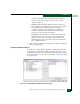
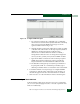
2. At the Hardware View, select Switch Binding, then Edit Membership
List from the Configure menu. The Switch Binding - Membership List
dialog box displays (Figure 2-48). WWNs of devices that are
allowed to connect to director ports appear in the Switch
Membership List panel.
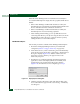
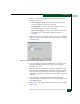
3. If nicknames are configured (through the SAN management
application) and are to be displayed instead of WWNs, click
Display Options. The Display Options dialog box displays
(Figure 2-49). If nicknames are not configured, go to step 5.
Figure 2-49 Display Options Dialog Box
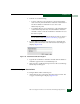
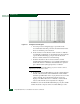
4. Click the Nickname radio button, then click OK. The dialog box
closes and nicknames appear in the Switch Binding - Membership
List dialog box.