
FW 07.00.00/HAFM SW 08.06.00 McDATA Intrepid 6064 Director Installation and Service Manual (620-000108-920, April 2005)



2
Task 8: Configure the Director at the Element Manager Application
2-63
Installation Tasks
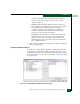
5. Perform one of the following:
• To allow a director port connection to a device listed in the
Node List Panel, select the WWN or nickname and click Add>>.
The device WWN or nickname moves to the Switch
Membership List panel.
• To prohibit a director port connection to a device listed in the
Switch Membership List Panel, select the WWN or nickname
and click <<Remove. The device WWN or nickname moves to
the Node List panel.
NOTE: Device connectivity and membership list edits are subject to
the rules defined under Background: Switch Binding on page 2-59.
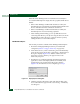
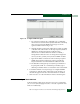
6. To add a WWN or nickname for a device not connected to the
director, click Detached Node. The Add Detached Node dialog box
displays (Figure 2-50).
Figure 2-50 Add Detached Node Dialog Box
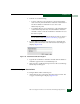
7. Type the device WWN or nickname and click OK. The WWN or
nickname appears in the Switch Membership List.
8. Click Activate to enable the changes and close the Switch Binding -
Membership List dialog box.
Subtask H: Configure Director Ports
To configure director Fibre Channel ports:
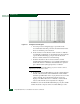
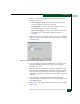
1. At the Hardware View, select Ports from the Configure menu. The
Configure Ports dialog box displays (Figure 2-51).