
FW 07.00.00/HAFM SW 08.06.00 McDATA Intrepid 6064 Director Installation and Service Manual (620-000108-920, April 2005)



2
2-64
Intrepid® 6064 Director Installation and Service Manual
Installation Tasks
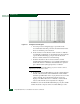
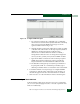
Figure 2-51 Configure Ports Dialog Box
a. For each port to be configured, type a port name in the
associated Name field. The port name should characterize the
device to which the port is attached.
b. Click a check box in the Blocked column to block or unblock a
port (default is unblocked). A check mark in the box indicates
a port is blocked. Blocking a port prevents the attached
devices or fabric switch from communicating.
c. Click the check box in the 10-100 km column to enable
extended distance buffering for a port (default is disabled). A
check mark in the box indicates extended distance operation
up to 100 kilometers (through repeaters) is enabled.
NOTE: If a Director supports BB credits by port, the 10-100 Km column is
replaced by an RX BB Credit column.
d. If a Director supports BB credits by port, this column displays
instead of the 10-100 Km column. Minimum and maximum
allowable port BB credit values vary by Director. If an invalid
value is entered, An Invalid RX BB Credit error message
displays. The BB Credit value is validated as entered. Click
Activate and a RX-BB Credit Confirmation box displays.
In addition to the maximum BB credit limit per port, the total BB
credits allocated to all ports cannot exceed the buffer pool size.