
FW 07.00.00/HAFM SW 08.06.00 McDATA Intrepid 6064 Director Installation and Service Manual (620-000108-920, April 2005)



2
Task 8: Configure the Director at the Element Manager Application
2-65
Installation Tasks
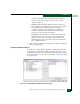
NOTE: Only 24-Port switches have a switch-wide buffer pool. The Configure
Ports dialog box displays the total and available buffers at the bottom of the
dialog box. When information is changed in the RX BB Credit column, this
information also updates. If information is entered that exceeds the buffer
pool and Activate is clicked, an error message displays. Also, ports for the
24-Port switches can be individually configured between 2-12, with a total
number of port credits of 150.
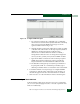
Right-clicking in the RX-BB Credit column displays a RX BB
Credits dialog box. For switches without buffer pools, this dialog
box allows you to Set all... which sets all ports to a single value or
Set all to maximum which set all ports to a maximum BB credit
value. For switches with buffer pools, this dialog box allows you
to Set all... which sets all ports to a single value or to Distribute
which evenly distributes the pool buffers among all ports.
Clicking OK changes the values in the Configure Port dialog box.
Clicking Activate changes the values on the Director.
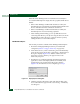
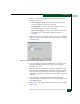
e. Clicking Set all... displays the Set All RX BB Credits dialog box.
Entering a value for RX BB Credit and clicking OK propagates
the value to all ports on the Configure Ports dialog box. If an
invalid value is entered, a message dialog box displays.
f. Click the check box in tClick the check box in the LIN Alerts
column to enable or disable link incident (LIN) alerts (default
is enabled). A check mark in the box indicates alerts are
enabled. When the feature is enabled and an incident occurs
on the port link, an alert indicator (yellow triangle) displays at
the Hardware View, and a message is sent to configured e-mail
recipients.
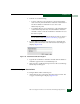
g. Select from the drop-down list in the Type column to configure
the port type. Available selections are:
• Generic port (G_Port).
• Fabric port (F_Port).
•Expansion port (E_Port).
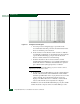
2. Select from the drop-down list in the Speed column to configure
the port transmission rate. Available selections are:
• Auto-negotiate between 1.0625, 2.125, and 10.625 Gbps
operation (Negotiate). This is the default.
• 1.0625 Gbps operation (1 Gb/sec).