
FW 07.00.00/HAFM SW 08.06.00 McDATA Intrepid 6064 Director Installation and Service Manual (620-000108-920, April 2005)



2
2-66
Intrepid® 6064 Director Installation and Service Manual
Installation Tasks
• 2.125 Gbps operation(2 Gb/sec).
• 10.625 Gbps operation(10 Gb/sec).
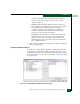
h. Click the check box in the Port Binding column to enable or
disable port binding (default is disabled). A check mark in the
box indicates port binding is enabled and the port can connect
only to a device with a WWN listed in the Bound WWN
column.
i. If port binding is enabled, type the WWN or nickname of the
device attached to the port in the Bound WWN column.
• If the check box in the Port Binding column is checked and a
WWN or nickname appears in the Bound WWN field, only
the specified device can attach to the port.
• If the check box in the Port Binding column is checked but
no WWN or nickname appears in the Bound WWN field, no
device can connect to the port.
• If the check box in the Port Binding column is not checked,
any device can connect to the port.
3. Click Activate to save the information and close the Configure Ports
dialog box.
Subtask I: Configure SNMP Trap Message Recipients
Perform this procedure to configure community names, write
authorizations, network addresses, and SNMP trap message
recipients. A trap recipient is a management workstation that
receives notification (through SNMP) if a director event occurs.
To configure SNMP trap recipients:
1. At the Hardware View for the selected director, select SNMP Agent
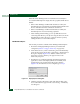
from the Configure menu. The Configure SNMP dialog box
displays (Figure 2-52).