
FW 07.00.00/HAFM SW 08.06.00 McDATA Intrepid 6064 Director Installation and Service Manual (620-000108-920, April 2005)



2
Task 8: Configure the Director at the Element Manager Application
2-67
Installation Tasks
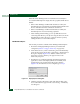
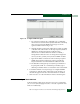
Figure 2-52 Configure SNMP Dialog Box
a. For each trap recipient to be configured, type a community
name in the associated Community Name field. The community
name is incorporated in SNMP trap messages to ensure
against unauthorized viewing or use.
b. Click the check box in the Write Authorization column to enable
or disable write authorization for the trap recipient (default is
disabled). A check mark in the box indicates write
authorization is enabled. When the feature is enabled, a
management workstation user can change the management
server sysContact, sysName, and sysLocation SNMP variables.
c. Type the IP address or DNS host name of the trap recipient
(SNMP management workstation) in the associated Tra p
Recipient field. It is recommended the IP address be used.
d. The default user datagram protocol (UDP) port number for
trap recipients is 162. To override this port number, type a
decimal port number in the associated UDP Port Number field.
2. To enable transmission of trap messages to configured SNMP
workstations, click the Enable Authorization Traps check box. A
check mark appears in the box when transmission is enabled.
3. Click Activate to save the information and close the dialog box.
Subtask J: Configure Threshold Alerts
A threshold alert notifies users when an E_Port or F_Port transmit
(Tx) or receive (Rx) throughput reaches or exceeds a specified value.
Alerts are indicated by: