
FW 07.00.00/HAFM SW 08.06.00 McDATA Intrepid 6064 Director Installation and Service Manual (620-000108-920, April 2005)



2
2-68
Intrepid® 6064 Director Installation and Service Manual
Installation Tasks
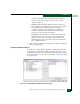
• An attention indicator (yellow triangle) associated with a port at
the Hardware View.
• An attention indicator (yellow triangle) in the Alert column at the
Port List View.
• An attention indicator (yellow triangle) in the Threshold Alerts
field at the Port Properties dialog box.
• Data recorded in the Threshold Alert Log.
To configure threshold alerts:
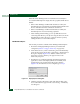
1. At the Hardware View for the selected director, select Threshold
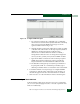
Alerts from the Configure menu. The Configure Threshold Alert(s)
dialog box displays (Figure 2-53).
Figure 2-53 Configure Threshold Alert(s) Dialog Box
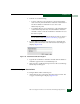
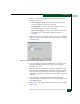
2. Click New. The New Threshold Alert dialog box (screen 1) displays
(Figure 2-54).
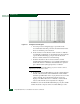
Figure 2-54 New Threshold Alerts Dialog Box (Screen 1)
3. Type a name in the Threshold Alert Name field.