
FW 07.00.00/HAFM SW 08.06.00 McDATA Intrepid 6064 Director Installation and Service Manual (620-000108-920, April 2005)



2
Task 8: Configure the Director at the Element Manager Application
2-69
Installation Tasks
4. Select one of the following from the drop-down list under the
Threshold Type field:
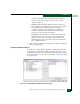
• Rx Throughput - An alert occurs if the threshold value for
receive throughput is reached or exceeded.
• Tx Throughput - An alert occurs if the threshold value for
transmit throughput is reached or exceeded.
• Rx or Tx Throughput - An alert occurs if the threshold value
for either receive or transmit throughput is reached or
exceeded.
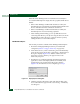
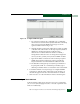
5. Click Next. The New Threshold Alert dialog box (screen 2) displays
(Figure 2-55). The name configured for the alert appears at the top
of the dialog box.
Figure 2-55 New Threshold Alerts Dialog Box (Screen 2)
6. Type a percentage from 1 through 100 in the % utilization field.
When throughput reaches this percentage of port capacity, a
threshold alert occurs.
7. Type the cumulative minutes for which the % utilization should
exist during the notification interval before an alert is generated.
Select At any time to specify that an alert will occur when the %
utilization is reached. The valid range is 1 to the interval set in the
next step.
8. Type the interval (in minutes) during which throughput is
measured and threshold notifications can occur. The valid range
is 5 to 70560 minutes.
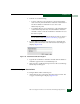
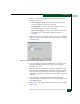
9. Click Next. The New Threshold Alert dialog box (screen 3) displays
(Figure 2-56).