
FW 07.00.00/HAFM SW 08.06.00 McDATA Intrepid 6064 Director Installation and Service Manual (620-000108-920, April 2005)



2
2-70
Intrepid® 6064 Director Installation and Service Manual
Installation Tasks
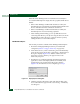
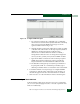
Figure 2-56 New Threshold Alerts Dialog Box (Screen 3)
10. Select the Port Type or Port List radio button.
•Select Port Type radio button, then the E_Ports or F_Ports radio
button to cause an alert to generate for all ports configured as
either E_Ports or F_Ports.
•Select Port List to configure individual ports by clicking the
check box adjacent to each port number. Select Set All Ports to
place a check mark adjacent to all port numbers. Select Clear
All Ports to clear the check marks by port numbers.
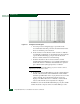
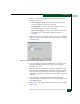
11. Click Next. The New Threshold Alert dialog box (screen4) displays
(Figure 2-57). This screen provides a summary of the alert
configuration. To make changes, move back and forth through the
configuration screens by selecting Previous or Next.
Figure 2-57 New Threshold Alerts Dialog Box (Screen 4)