
FW 07.00.00/HAFM SW 08.06.00 McDATA Intrepid 6064 Director Installation and Service Manual (620-000108-920, April 2005)


2
Task 8: Configure the Director at the Element Manager Application
2-71
Installation Tasks
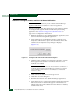
12. Click Finish. The Configure Threshold Alerts dialog box
(Figure 2-53) appears listing the name, type, and state of the
configured alert.
13. To activate the alert, highlight (select) the alert and click Activate.
Subtask K: Configure OpenTrunking
Perform this procedure to configure the OpenTrunking parameters.
1. Ensure the OpenTrunking feature is installed and configured
(Subtask D: Configure Feature Key on page 2-45).
2. Ensure the director is online (Set the Director Online or Offline on
page 4-43).
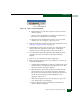
3. At the Hardware View for the selected director, select OpenTrunking
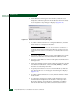
from the Configure menu. The Configure OpenTrunking dialog box
displays (Figure 2-58).
Figure 2-58 Configure OpenTrunking Dialog Box
4. Perform one of the following:
• To enable OpenTrunking, click the Enable OpenTrunking check
box to add a check mark. Go to step 5 to set the congestion
threshold for each port.