
FW 07.00.00/HAFM SW 08.06.00 McDATA Intrepid 6064 Director Installation and Service Manual (620-000108-920, April 2005)


2
2-74
Intrepid® 6064 Director Installation and Service Manual
Installation Tasks
2. At the EFCM or SANavigator main window, select the Event
Notification and Email options from the Monitor menu. The Email
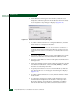
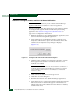
Event Notification Setup dialog box displays (Figure 2-59).
Figure 2-59 Email Event Notification Setup Dialog Box
3. To enable e-mail transmission to configured addresses, click the
Enable Email Event Notification check box.
NOTE: The enable function must also be activated for each director or
switch through the Intrepid 6064 Element Manager application. E-mail
notification can be active for some directors or switches and inactive for
others.
4. Type the IP address or DNS host name of the SMTP server in the
E-mail Server field. It is recommended the IP address be used.
5. Type the e-mail address to which e-mail replies should be sent in
the Reply field.
6. At the Interval field, type the length of time the application should
wait between notifications. Choose seconds, minutes, or hours
from the associated drop-down list.
7. To specify users that are to receive e-mail notification, click User
List. The EFCM Server or SANavigator Users dialog box displays
(Figure 2-33).
8. To enable e-mail notification for a user, click the check box in the
Email column.
9. To configure event types for which e-mail notification is sent,
click the Filter link adjacent to the check box. The Define Filter
dialog box displays. For instructions on defining event filters,
refer to the McDATA Intrepid 6140 and 6064 Directors Element