
FW 07.00.00/HAFM SW 08.06.00 McDATA Intrepid 6064 Director Installation and Service Manual (620-000108-920, April 2005)


2
Task 8: Configure the Director at the Element Manager Application
2-75
Installation Tasks
Manager User Manual (620-000153), McDATA Enterprise Fabric
Connectivity Manager User Manual (620-005001), or SANavigator
User Guide (621-000013).
10. Click OK to close the EFCM Server or SANavigator Users dialog
box.
11. Click Test Email. A test message is sent to configured e-mail
recipients.
12. Click OK to save the information and close the Email Event
Notification Setup dialog box.
13. Maximize the Hardware View (Element Manager application).
14. At the Hardware View, select Enable E-Mail Notification from the
Maintenance menu. A check mark appears in the check box to
indicate e-mail notification for the director is enabled, and the
menu closes.
Subtask N: Configure and Enable Ethernet Events
Perform this procedure to configure and enable Ethernet events. An
Ethernet event is recorded (after a user-specified time interval) when
the director-to-management server communication link drops. To
configure and enable Ethernet events:
1. Minimize the Hardware View (Element Manager application) and
return to the SAN management application.
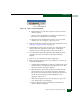
2. At the SANavigator or EFCM main window, select the Ethernet
Event option from the Monitor menu. The Configure Ethernet
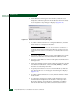
Events dialog box displays (Figure 2-60).
Figure 2-60 Configure Ethernet Events Dialog Box
3. Click the Enable Ethernet Events check box.
4. At the Ethernet Timeout field, type a value between 10 through 120
minutes.
5. Click OK to close the dialog box.