
FW 07.00.00/HAFM SW 08.06.00 McDATA Intrepid 6064 Director Installation and Service Manual (620-000108-920, April 2005)


2
2-76
Intrepid® 6064 Director Installation and Service Manual
Installation Tasks
Subtask O: Configure, Enable, and Test Call-Home Notification
NOTE: The call-home feature may not be available if the EFC Manager
application (EFCM Lite) is installed on a customer-supplied PC.
Telephone numbers and other information for the call-home feature
are configured through the Windows 2000 dial-up networking
application. See Subtask E: Configure the Call-Home Feature on
page 2-38 for configuration instructions.
1. Minimize the Hardware View (Element Manager application) and
return to the SAN management application.
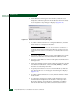
2. At the SANavigator or EFCM main window, select the Event
Notification and Call Home options from the Monitor menu. The
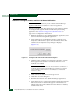
Call Home Event Notification Setup dialog box displays
(Figure 2-61).
Figure 2-61 Configure Call Home Event Notification Dialog Box
3. Click the Enable Call Home Event Notification check box. A check
mark appears in the check box to indicate call-home event
notification is enabled.
NOTE: The enable function must also be activated for each director or
switch through the director Element Manager application. Call-home
event notification can be active for some directors or switches but
inactive for others.
4. Click Send Test. A call-home test message is sent.
5. Click OK to close the dialog box.
6. Maximize the Hardware View (Element Manager application).
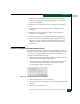
7. At the Hardware View, select Enable Call Home Notification from the
Maintenance menu. A check mark appears in the check box to
indicate call-home event notification for the director is enabled,
and the menu closes.