
FW 07.00.00/HAFM SW 08.06.00 McDATA Intrepid 6064 Director Installation and Service Manual (620-000108-920, April 2005)


2
2-78
Intrepid® 6064 Director Installation and Service Manual
Installation Tasks
• Device tab allows the security administrator to set device to device
authentication parameters. Device tab is PFE key enabled. If a
proper PFE key is not provided, the Devices tab is not accessible.
• IP Access Control List tab allows the security administrator to
setup IP addresses that can manage the switch.
• Radius Server tab allows security administrator to set Radius
server parameters that the switch can use to pass on the
authentication information to the designated Radius servers.
8. For complete details on configuring SANtegrity authenitcation,
review the Elem
Task 10: Back Up Configuration Data
For the EFCM 8.5 application, critical configuration data is stored on
the management server hard drive in the following directories:
• C:\Program Files\EFCM 8.5\CallHome
• C:\Program Files\EFCM 8.5\Client
• C:\Program Files\EFCM 8.5\Server.
For the SANavigator 4.1 application, critical configuration data is
stored on the management server hard drive in the following
directories:
• C:\Program Files\SANavigator4.1\CallHome
• C:\Program Files\SANavigator4.1\Client
• C:\Program Files\SANavigator4.1\Server.
To back up management server configuration data and create a base
restore CD:
1. Insert a blank rewritable CD into the CD-RW drive and format
the CD.
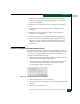
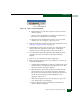
a. At the Windows 2000 desktop, locate the InCD icon at the
right side of the task bar (Figure 2-62).