
FW 07.00.00/HAFM SW 08.06.00 McDATA Intrepid 6064 Director Installation and Service Manual (620-000108-920, April 2005)




2
2-82
Intrepid® 6064 Director Installation and Service Manual
Installation Tasks
NOTE: In addition to these tasks, there are other tasks which are documented
in the SANpilot User Manual and include: Configuring RADIUS Servers,
Configuring IP Access Control List, and Configuring Preferred Path. These
are advanced topics which are not convered in this document.
Subtask A: Connect Director to Internet or Ethernet LAN Segment
A PC platform with Internet access and standard web browser
running Netscape Navigator® 4.6 or higher or Microsoft Internet
Explorer 4.0 or higher is required.
1. Connect one end of the Ethernet patch cable (supplied with the
director) to the RJ-45 connector (labelled 10/100) on the director
chassis.
2. Connect the remaining end of the Ethernet cable.
• Connect the cable to an Internet port or Internet-connected
LAN segment as directed by the customer network
administrator, or
• If the McDATA-qualified Ethernet hub provides Internet
connectivity, connect the cable to any available hub port.
Subtask B: Open the SANpilot Interface
To open the SANpilot interface:
1. Ensure the PC and the Ethernet LAN segment (with the director
attached) are connected through the Internet.
2. At the PC, launch the browser application (Netscape Navigator
or
Internet Explorer).
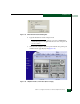
3. At the browser, enter the IP address of the director as the Internet
uniform resource locator (URL). Use the default IP address of
10.1.1.10. The Enter Network Password dialog box displays
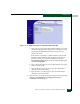
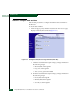
(Figure 2-63).