
FW 07.00.00/HAFM SW 08.06.00 McDATA Intrepid 6064 Director Installation and Service Manual (620-000108-920, April 2005)




2
2-84
Intrepid® 6064 Director Installation and Service Manual
Installation Tasks
Subtask C: Configure Director Ports
Perform procedures in this section to configure names and operating
characteristics for Fibre Channel ports.
To configure one or more director ports:
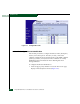
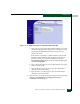
1. At the View panel, select the Configure option at the left side of the
panel. The Configure panel opens with the Ports page displayed
(Figure 2-65). Use the vertical scroll bar to display additional port
information rows.
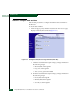
Figure 2-65 Configure Panel (Ports Page with Basic Info tab)
a. For each port to be configured, type a port name in the
associated Name field. The port name should characterize the
device to which the port is attached.
b. Click a check box in the Blocked column to block or unblock a
port (default is unblocked). A check mark in the box indicates
a port is blocked. Blocking a port prevents the attached device
or fabric switch from communicating.
c. Click the check box in the 10-100 km column to enable
extended distance buffering for a port (default is disabled). A
check mark in the box indicates extended distance operation
up to 100 kilometers (through repeaters) is enabled.
d. Select from the drop-down list in the Type column to configure
the port type. Available selections are: