
FW 07.00.00/HAFM SW 08.06.00 McDATA Intrepid 6064 Director Installation and Service Manual (620-000108-920, April 2005)




2
2-88
Intrepid® 6064 Director Installation and Service Manual
Installation Tasks
Subtask F: Configure Date and Time
Perform this procedure to configure the effective date and time for
the director.
To set the date and time:
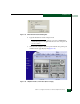
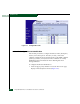
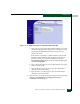
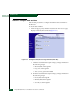
1. At the Configure panel, click the Date/Time tab. The Director page
displays with Date/Time selected (Figure 2-68).
Figure 2-68 Configure Panel (Director Page with Date/Time Tab)
a. Click the Date fields that require change, and type numbers in
the following ranges:
•Month (MM): 1 through 12.
•Day (DD): 1 through 31.
•Year (YYYY): greater than 1980.
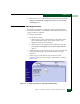
b. Click the Time fields that require change, and type numbers in
the following ranges:
•Hour (HH): 0 through 23.
•Minute (MM): 0 through 59.
•Second (SS): 0 through 59.