
FW 07.00.00/HAFM SW 08.06.00 McDATA Intrepid 6064 Director Installation and Service Manual (620-000108-920, April 2005)





2
Task 11: Configure the Director at the SANpilot Interface
2-91
Installation Tasks
5. If fabric parameters require configuration, go to Subtask H:
Configure Fabric Parameters following. If the configuration is
complete, set the director online.
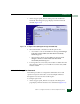
a. At the Configure panel, select the Operations option at the left
side of the panel. The Operations panel opens and the Director
page displays with the Beacon tab selected
b. Click the Online State tab, then click Set Online. The message
Your operations changes have been successfully activated
appears.
Subtask H: Configure Fabric Parameters
Perform this procedure to configure the fabric operating parameters,
including resource allocation time out value (R_A_TOV), E_D_TOV,
switch priority, and interop mode.
To configure parameters:
1. If required, set the director offline.
a. At the Configure panel, select the Operations option at the left
side of the panel. The Operations panel opens and the Director
page displays with the Beacon tab selected
b. Click the Online State tab, then click Set Offline. The message
Your operations changes have been successfully activated
appears.
2. At the Operations panel, select the Configure option at the left side
of the panel. The Configure panel opens with the Ports page
displayed.
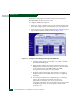
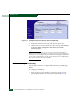
3. At the Configure panel, click the Director tab, then click the Fabric
Parameters tab. The Director page displays with the Fabric
Parameters tab selected (Figure 2-70).