
FW 07.00.00/HAFM SW 08.06.00 McDATA Intrepid 6064 Director Installation and Service Manual (620-000108-920, April 2005)





2
2-94
Intrepid® 6064 Director Installation and Service Manual
Installation Tasks
Subtask I: Configure Network Information
Verify the type of LAN installation with the customer network
administrator. If one director is installed on a dedicated LAN,
network information (IP address, subnet mask, and gateway address)
does not require change. Go to Subtask J: Configure SNMP on
page 2-95.
If multiple directors or switches are installed or a public LAN
segment is used, network information must be changed to conform to
the customer LAN addressing plan.
To change a director IP address, subnet mask, or gateway address:
1. At the Operations panel, select the Configure option at the left side
of the panel. The Configure panel opens with the Ports page
displayed.
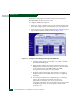
2. At the Configure panel, click the Director tab, then click the
Network tab. The Director page displays with the Network tab
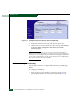
selected (Figure 2-71).
Figure 2-71 Configure Panel (Director Page with Network Tab)
a. At the IP Address field, type the new value as specified by the
customer network administrator (default is 10.1.1.10).
b. At the Subnet Mask field, type the new value as specified by
the customer network administrator (default is 255.0.0.0).