
FW 07.00.00/HAFM SW 08.06.00 McDATA Intrepid 6064 Director Installation and Service Manual (620-000108-920, April 2005)





2
2-96
Intrepid® 6064 Director Installation and Service Manual
Installation Tasks
recipient is a management workstation that receives notification
(through SNMP) if a director event occurs.
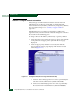
To configure SNMP trap recipients:
1. At the View panel, select the Configure option at the left side of the
panel. The Configure panel opens with the Ports page displayed.
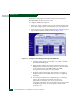
2. At the Configure panel, click the Management tab. The Management
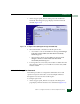
page displays with the SNMP tab selected (Figure 2-72).
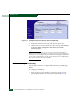
Figure 2-72 Configure Panel (Management Page with SNMP Tab)
a. Click the Enable SNMP Agent check box to enable or disable
the installed SNMP agent.
b. Select the Fibre Alliance management information base (FA
MIB) from the FA MIB Version drop-down list. This should be
set to match the level of FA MIB used by the SNMP
management stations that access the product.
c. Click the Enable Authentication Traps check box to enable or
disable transmission of SNMP trap messages to configured
recipients.
d. For each trap recipient to be configured, type a community
name in the Community Name field of less than 32
alphanumeric characters (you can use spaces in the
community name field). The community name is incorporated
in SNMP trap messages to ensure against unauthorized
viewing or use.