
FW 07.00.00/HAFM SW 08.06.00 McDATA Intrepid 6064 Director Installation and Service Manual (620-000108-920, April 2005)





2
Task 11: Configure the Director at the SANpilot Interface
2-97
Installation Tasks
e. Click the check box in the Write Authorization column to enable
or disable write authorization for the trap recipient (default is
disabled). A check mark indicates write authorization is
enabled. When the feature is enabled, a management
workstation user can change sysContact, sysName, and
sysLocation SNMP variables.
f. Type the IP address or DNS host name of the trap recipient
(SNMP management workstation) in the Trap Recipient field in
four-byte, dotted-decimal format with a maximum of 16
characters. It is recommended the IP address be used.
g. The default UDP port number for trap recipients is 162. Type a
decimal port number in the UDP Port Number field to override
the default value. The range for the UDP port number value is
1 to 65535.
3. Click Activate to save and activate the changes. The message Your
changes to the SNMP configuration have been successfully
activated appears.
Subtask K: Enable or Disable the CLI and SSH
Perform this procedure to toggle (enable or disable) the state of the
director command line interface (CLI) as well as the configuration of
the secure shell which is used to provide secure access and
enctrypted data when using the Telnet function.
To change the CLI state:
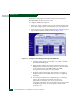
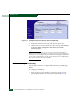
1. At the Configure panel, click the CLI tab. The Management page
displays with the CLI tab selected (Figure 2-73).