
FW 07.00.00/HAFM SW 08.06.00 McDATA Intrepid 6064 Director Installation and Service Manual (620-000108-920, April 2005)

2
Task 11: Configure the Director at the SANpilot Interface
2-103
Installation Tasks
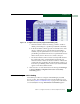
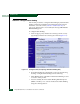
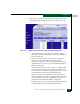
Figure 2-77 Configure Panel (Security Page with Switch Binding Tab)
2. Select the connection policy from the Switch Binding State
drop-down list. The switch binding state indicates the type of
binding restrictions imposed on the director. Switch binding is
enabled by activating Enterprise Fabric Mode (Subtask Q: Enable
or Disable Enterprise Fabric Mode on page 2-107) or by enforcing a
connection policy at the Switch Binding State drop-down list.
Available selections are:
• Enable & Restrict E_Ports - Uses the switch binding
membership list to restrict devices that can attach to the
director through E_Ports.
• Enable & Restrict F_Ports - Uses the switch binding
membership list to restrict devices that can attach to the
director through F_Ports.
• Enable & Restrict All Ports - Uses the switch binding
membership list to restrict devices that can attach to the
director through any port.
• Disable Switch Binding - Sets the switch binding state to
disabled and removes restrictions on devices that can attach to
the director.