
FW 07.00.00/HAFM SW 08.06.00 McDATA Intrepid 6064 Director Installation and Service Manual (620-000108-920, April 2005)

2
2-106
Intrepid® 6064 Director Installation and Service Manual
Installation Tasks
Subtask P: Configure Fabric Binding
Perform this procedure to configure fabric binding by attached fabric
member (domain ID and WWN). The SANtegrity feature must be
installed to access this control (Subtask S: Install Feature Keys on
page 2-111). If the feature is not installed, the message This Feature
Not Installed appears.
To configure fabric binding:
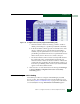
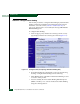
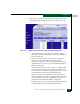
1. At the Configure panel, click the Fabric Binding tab. The Security
page displays with the Fabric Binding tab selected (Figure 2-78).
Figure 2-78 Configure Panel (Security Page with Fabric Binding Tab)
2. The Fabric Binding tab is divided into sections by the following
headings. Configure fabric binding from the following:
• Fabric Binding Status—Identifies whether Fabric Binding is active
or inactive on the product.
• Actions to Modify the Active Fabric Binding Membership List
(FBML)—Enables you to activate and deactivate Fabric Binding
using the following buttons: