
FW 07.00.00/HAFM SW 08.06.00 McDATA Intrepid 6064 Director Installation and Service Manual (620-000108-920, April 2005)

2
2-108
Intrepid® 6064 Director Installation and Service Manual
Installation Tasks
page 2-111). If the feature is not installed, the message This Feature
Not Installed appears.
To enable or disable EFM:
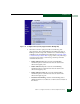
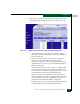
1. At the Configure panel, click the EFM tab. The Security page
displays with the EFM tab selected (Figure 2-79).
2. Perform one of the following steps as required:
• Click Enable to activate EFM. The message Your changes to
enterprise fabric mode have been successfully activated
appears.
• Click Disable to deactivate EFM. The message Your changes to
enterprise fabric mode have been successfully activated
appears.
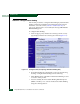
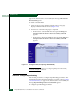
Figure 2-79 Configure Panel (Security Page with EFM Tab)
NOTE: For detailed information on configuring Enterprise Fabric Mode,
review the SANpilot User Manual.
Subtask R: Configure OpenTrunking
Perform this procedure to configure OpenTrunking parameters. The
OpenTrunking feature must be installed to access this control (Subtask
S: Install Feature Keys on page 2-111). If the feature is not installed, the
message OpenTrunking Feature Not Installed appears.
To configure OpenTrunking parameters: