
FW 07.00.00/HAFM SW 08.06.00 McDATA Intrepid 6064 Director Installation and Service Manual (620-000108-920, April 2005)



xvi
Intrepid® 6064 Director Installation and Service Manual
Figures
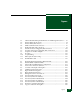
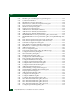
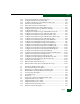
3-14 Windows Task Manager Dialog Box (Applications Page) .................... 3-50
3-15 Shut Down Windows Dialog Box ............................................................. 3-51
3-16 LCD Panel During Boot Sequence ............................................................ 3-51
3-17 Dr. Watson for Windows 2000 Dialog Box .............................................. 3-55
3-18 LCD Panel During Boot Sequence ............................................................ 3-56
3-19 Ethernet Hubs, Daisy-Chained ................................................................. 3-62
3-20 LCD Panel (LAN 2 IP Address) ................................................................ 3-65
3-21 Connection Description Dialog Box ......................................................... 3-67
3-22 Connect To Dialog Box ............................................................................... 3-67
3-23 COMn Properties Dialog Box .................................................................... 3-68
3-24 Intrepid 6064 - HyperTerminal Dialog Box ............................................. 3-69
3-25 HyperTerminal Dialog Box ....................................................................... 3-69
3-26 HyperTerminal Dialog Box ....................................................................... 3-69
3-27 Discover Setup Dialog Box ........................................................................ 3-70
3-28 Editing Domain Information Dialog Box ................................................ 3-71
3-29 Domain Information Dialog Box (IP Address Page) .............................. 3-71
3-30 EFCM or SANavigator Message Dialog Box ........................................... 3-72
3-31 Domain Information Dialog Box (IP Address Page) .............................. 3-72
3-32 UPM Card Diagram (OSI) .......................................................................... 3-86
3-33 UPM Card Diagram (FICON) ................................................................... 3-86
3-34 Configure Fabric Parameters Dialog Box ................................................ 3-93
3-35 Switch Binding - State Change Dialog Box ............................................. 3-96
3-36 Fabric Binding Dialog Box ......................................................................... 3-97
3-37 Switch Binding - Membership List Dialog Box ...................................... 3-98
3-38 Clear Link Incident Alert(s) ....................................................................... 3-99
3-39 UPM Card Diagram (OSI) ........................................................................ 3-104
3-40 UPM Card Diagram (FICON) ................................................................. 3-105
3-41 Configure Fabric Parameters Dialog Box .............................................. 3-112
3-42 Configure Switch Parameters Dialog Box ............................................. 3-113
3-43 Zoning Dialog Box (Zone Library Tab) .................................................. 3-114
3-44 Zoning Dialog Box (Active Zone Set Tab) ............................................. 3-115
3-45 EFCM or SANavigator Message Dialog Box ......................................... 3-123
3-46 Windows Task Manager Dialog Box ...................................................... 3-124
3-47 Shut Down Windows Dialog Box ........................................................... 3-125
3-48 LCD Panel During Boot Sequence .......................................................... 3-125
3-49 EFCM Log In or SANavigator Log In Dialog Box ................................ 3-126
3-50 LCD Panel During Boot Sequence .......................................................... 3-128
4-1 Event Log ....................................................................................................... 4-4
4-2 Product Status Log ........................................................................................ 4-5
4-3 Intrepid 6064 Event Log ............................................................................... 4-7
4-4 Intrepid 6064 Hardware Log ....................................................................... 4-8
4-5 Intrepid 6064 Link Incident Log ................................................................. 4-9