
FW 07.00.00/HAFM SW 08.06.00 McDATA Intrepid 6064 Director Installation and Service Manual (620-000108-920, April 2005)

2
2-110
Intrepid® 6064 Director Installation and Service Manual
Installation Tasks
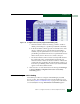
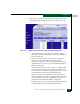
d. The low BB_Credit threshold is the percent time an ISL is
allowed to not transmit data because BB_Credit is unavailable.
When the threshold is exceeded, data is rerouted to another
ISL. In addition, traffic cannot be rerouted to another low-
threshold ISL. Use one of the following to set the low
BB_Credit threshold:
• Click the Default check box. A check mark appears in the
box and a calculated default value appears (1% to 99%) in
the Low BB_Credit Threshold field. If the default is enabled, a
value cannot be entered in the Low BB_Credit Threshold
field.
• Ensure the Default check box is blank. At the Low BB_Credit
Threshold field, type a percentage value from 1% to 99%.
NOTE: The default low BB_Credit threshold is calculated by the
director firmware.
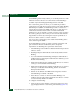
2. For each director port:
a. Click the check box in the Default Threshold % column. A check
mark appears in the box and a calculated default value
appears (1% to 99%) in the associated field in the Threshold %
column. If the default is enabled, a value cannot be entered in
the Threshold % column.
b. Ensure the check box in the Default Threshold % column is
blank. At the associated field in the Threshold % column, type a
percentage value from 1% to 99%.
NOTE: The default low BB_Credit threshold is calculated by the
director firmware.
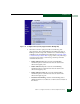
3. Click Activate to save the information. The message Your changes
to the port binding configuration have been successfully
activated appears.
4. If additional optional features will be installed, go to Subtask S:
Install Feature Keys following. If no feature keys will be installed,
go to Task 11: Cable Fibre Channel Ports on page 2-113.