
FW 07.00.00/HAFM SW 08.06.00 McDATA Intrepid 6064 Director Installation and Service Manual (620-000108-920, April 2005)


2
Task 11: Configure the Director at the SANpilot Interface
2-111
Installation Tasks
Subtask S: Install Feature Keys
Perform this procedure to install one or more optional features:
A feature key is an alphanumeric string consisting of uppercase and
lowercase characters. The number of characters may vary. The feature
key is case sensitive and must be entered exactly, including dashes.
The following is an example of a feature key format:
XxXx-XXxX-xxXX-xX.
After obtaining the feature key, install the feature.
NOTE: You must be logged in as an Administrator-level rights to install
feature keys.
1. Set the director offline.
a. At the Configure panel, select the Operations option at the left
side of the panel. The Operations panel opens and the Director
page displays with the Beacon tab selected
b. Click the Online State tab, then click Set Offline. The message
Your operations changes have been successfully activated
appears.
2. At the Configure panel, select the Operations option at the left side
of the panel. The Operations panel opens with the Director page
displayed.
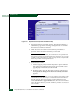
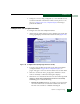
3. Click the Feature Installation tab. The Operations panel opens with
the Feature Installation page displayed (Figure 2-81).