
FW 07.00.00/HAFM SW 08.06.00 McDATA Intrepid 6064 Director Installation and Service Manual (620-000108-920, April 2005)


2
2-114
Intrepid® 6064 Director Installation and Service Manual
Installation Tasks
• Configure, change, enable, or disable zone sets. A zone set is a
group of zones that is activated or deactivated as a single entity
across all managed products in either a single director or a
multiswitch fabric. Only one zone set can be active at one time.
5. If the installation is being performed from the SANpilot interface,
go to Configure Zones (SANpilot Interface) following. If the
installation is being performed from the management server,
zoning is configured on a fabric-wide basis through the SAN
management application. Refer to the McDATA Intrepid 6140 and
6064 Directors Element Manager User Manual (620-000153),
McDATA Enterprise Fabric Connectivity Manager User Manual
(620-005001), or SANavigator User Guide (621-000013).
Configure Zones (SANpilot Interface)
To configure zones at the SANpilot interface:
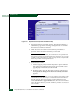
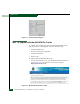
1. At the Configure panel, click the Zoning tab. The Zoning page
displays with the Zone Set tab selected. Click the Zones tab. The
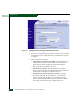
Zoning page displays with the Zones tab selected (Figure 2-82).
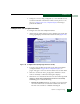
Figure 2-82 Configure Panel (Zoning Page with Zones Tab)
2. To configure a zone, add the zone name to the zoning library. The
following naming conventions apply to zones and zone sets: