
FW 07.00.00/HAFM SW 08.06.00 McDATA Intrepid 6064 Director Installation and Service Manual (620-000108-920, April 2005)


2
Task 12: Configure Zoning
2-115
Installation Tasks
• All names must be unique and may not differ by case only. For
example, zone-1 and Zone-1 are both valid individually, but
are not considered unique.
• The first character of a zone set name must be a letter (A
through Z or a through z).
• A zone set name cannot contain spaces.
• Valid characters are alphanumerics and the caret ( ^ ),
hyphen ( - ), underscore ( _ ), or dollar ( $ ) symbols.
• A zone set name can have a maximum of 64 characters.
NOTE: A director can have at most 1024 zones.
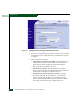
3. Type the zone name and click Add New Zone. After the name is
validated, the new zone name (Zone-1) and an associated Delete
button appear at the bottom of the page. Note the following:
• Save and activate the zone - Changes to a zone or zoning
configuration are not saved and activated on the director or
switch until saved as part of a zone set (Configure Zone Sets
(SANpilot Interface) on page 2-117).
• Delete all zones - To delete all configured zones and zone
members, click Delete All Zones. A confirmation dialog box
displays. Click OK to delete all zones.
• Delete a single zone - To delete a single zone and its zone
members, click the Delete button adjacent to the zone name. A
confirmation dialog box displays. Click OK to delete the zone.
• Display more zones - If a zone set contains more than 64
zones, the Display More Zones link activates to display
subsequent pages. In addition, the Display Previous Zones link
activates on subsequent displayed pages.
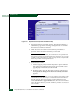
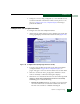
4. To add devices (members) to the zone, click the zone name
(Zone-1). The Zoning page displays with the Modify Zone tab
selected (Figure 2-83).