
FW 07.00.00/HAFM SW 08.06.00 McDATA Intrepid 6064 Director Installation and Service Manual (620-000108-920, April 2005)


2
2-116
Intrepid® 6064 Director Installation and Service Manual
Installation Tasks
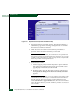
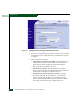
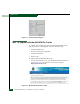
Figure 2-83 Configure Panel (Zoning Page with Modify Zone Tab)
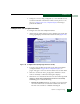
5. To rename a configured zone, type the new name in the Zone field
and click Rename Zone. After the name is validated, the zone name
is changed.
6. Add or delete zone members.
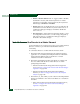
• Add member by attached node WWN - Select the WWN of an
attached device (node) from the Attached Node World Wide
Name drop-down list and click the adjacent Add Member
button. The device is added to the zone.
• Add member by WWN - Type the WWN of an attached
device in the World Wide Name field and click the adjacent Add
Member button. The device is added to the zone.
• Add member by domain ID and port number - Type the
domain ID (1 through 31) of the director or switch in the
Domain ID field, type the director port number to which a
device is attached, and click the adjacent Add Member button.
The device attached to that port is added to the zone.