
FW 07.00.00/HAFM SW 08.06.00 McDATA Intrepid 6064 Director Installation and Service Manual (620-000108-920, April 2005)


2
Task 12: Configure Zoning
2-117
Installation Tasks
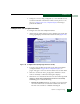
7. Changes to a zone, zoning configuration, or zone member are not
saved and activated on the director until saved as part of a zone
set. Go to Configure Zone Sets (SANpilot Interface) following to
perform this function.
Configure Zone Sets (SANpilot Interface)
To configure zone sets at the SANpilot interface:
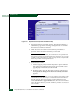
1. At the Configure panel and Zoning page, click the Zone Set tab. The
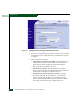
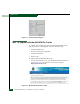
Zoning page displays with the Zone Set tab selected (Figure 2-84).
Figure 2-84 Configure Panel (Zoning Page with Zone Set Tab)
2. To create a zone set that incorporates zones and zone members
(configured under Configure Zones (SANpilot Interface) on
page 2-114), type a new zone set name in the Zone Set Name field.
3. Click Save and Activate Zoning Configuration. After the zone set
name is validated, a confirmation dialog box displays.
4. Click OK to save and activate the new zone set. The message Your
changes to the Zoning configuration have been successfully
activated appears. Note the following:
• Rename the pending zone set - To rename a zone set, type the
new name in the Zone Set Name field. Click Rename Zone Set.
The new zone set name is validated and changed.