
FW 07.00.00/HAFM SW 08.06.00 McDATA Intrepid 6064 Director Installation and Service Manual (620-000108-920, April 2005)




2
Task 13: Connect the Director to a Fabric Element
2-119
Installation Tasks
— If the values must be changed from the SANpilot interface, see
Task 11: Configure the Director at the SANpilot Interface on
page 2-80.
4. Route a multimode or singlemode fiber-optic cable (depending
on the type of transceiver installed) from a customer-specified
E_Port of the fabric element to the director.
5. If the director is managed by a management server, go to step 6. If
the director is managed by the SANpilot interface:
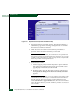
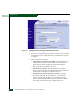
a. At the Configure panel, select the View option at the left side of
the panel. The View panel opens with the Director page
displayed.
b. Double-click the graphical port connector used for the fabric
ISL.
c. The View panel opens with the Port Properties page displayed.
Port properties appear for the selected port.
d. Ensure the Operational State field displays Online and the
Reason field displays N/A or is blank. If an ISL segmentation or
other problem is indicated, go to MAP 0000: Start MAP on
page 3-9 to isolate the problem. If no problems are indicated,
installation tasks are complete.
6. At the SAN management application physical map, right-click
the director icon, then select Element Manager from the pop-up
menu.
7. If required, click the Hardware tab. The Hardware View displays.
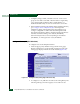
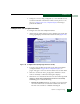
8. Double-click the graphical port connector used for the fabric ISL
The Port Properties dialog box displays (Figure 2-85).
9. Ensure the Link Incident field displays None and the Reason field
is blank. If an ISL segmentation or other problem is indicated, go
to Chapter 3, Maintenance Analysis Procedures (MAPS) to isolate
the problem.