
FW 07.00.00/HAFM SW 08.06.00 McDATA Intrepid 6064 Director Installation and Service Manual (620-000108-920, April 2005)


2
Task 14: Register with the McDATA File Center
2-121
Installation Tasks
2. Click the New User Registration option at the top of the home page.
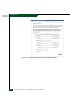
The File Center New User Registration page displays (Figure 2-87).
Use the registration page to input required and optional user
information. The following information is required:
• Password.
•Verify password.
• First name.
•Last name.
• E-mail address.
•Company.
•Title.
3. Complete the information fields and click Register. The
registration is complete and File Center login information is
transmitted to the e-mail address specified on the New User
Registration page.
4. At the browser PC, close the Internet session. If no director
problems are indicated, installation tasks are complete.