
FW 07.00.00/HAFM SW 08.06.00 McDATA Intrepid 6064 Director Installation and Service Manual (620-000108-920, April 2005)

3
MAP 0000: Start MAP
3-11
Maintenance Analysis Procedures (MAPS)
4
Did the management server or customer-supplied server crash and
display a blue screen with the system dump file in hexadecimal format
(blue screen of death)?
NO YES
↓ A management server or customer-supplied server
application problem is indicated. Event codes are not
recorded. Go to MAP 0300: Server Application Problem
Determination on page 3-49. Exit MAP.
5
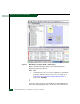
Is the SAN management application (EFCM or SANavigator) active?
NO YES
↓ Go to step 7.
6
Reboot the management server or customer-supplied server. If the
customer-supplied server does not use the Windows 2000 operating
system, refer to the supporting documentation to reboot the server.
a. At the Windows 2000 desktop, click Start at the left side of the
task bar (bottom of the desktop), then select Shut Down. The
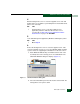
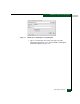
Shut Down Windows dialog box displays (Figure 3-1).
Figure 3-1 Shut Down Windows Dialog Box
b. Select the Shut Down option from the list box and click OK. The
management server powers down.