
FW 07.00.00/HAFM SW 08.06.00 McDATA Intrepid 6064 Director Installation and Service Manual (620-000108-920, April 2005)

3
3-16
Intrepid® 6064 Director Installation and Service Manual
Maintenance Analysis Procedures (MAPS)
9
At the director, inspect the amber LED at the top of each CTP2 card.
Is the amber LED illuminated on both CTP2 cards?
NO YES
↓ Failure of both CTP2 cards is indicated. Event codes are not
recorded. Go to MAP 0500: FRU Failure Analysis on
page 3-75. Exit MAP.
10
A director-to-server Ethernet link failure is indicated.
Go to step 23 to obtain event codes. If no event codes are found, go
to MAP 0400: Loss of Server Communication on page 3-57.
Exit MAP.
11
Is a red diamond (failure indicator) associated with the icon
representing the director reporting the problem?
YES NO
↓ Go to step 14.
12
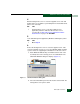
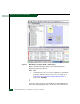
Right-click the icon representing the director reporting the problem. A
pop-up menu appears. Select the Element Manager option from the
menu. The Element Manager application opens and the Hardware
View displays.
At the Hardware View:
• Observe that the Intrepid 6064 Status table is yellow and the
director status is NOT OPERATIONAL.
• Inspect FRUs for a blinking red and yellow diamond (failed FRU
indicator) that overlays the FRU graphic.
Do blinking red and yellow diamonds overlay all port card graphics?
NO YES
↓ Failure of all installed port cards is indicated. Go to step 23
to obtain event codes. If no event codes are found, go to
MAP 0600: Port Card Failure and Link Incident Analysis on
page 3-83. Exit MAP.