
FW 07.00.00/HAFM SW 08.06.00 McDATA Intrepid 6064 Director Installation and Service Manual (620-000108-920, April 2005)

3
MAP 0000: Start MAP
3-17
Maintenance Analysis Procedures (MAPS)
13
Blinking red and yellow diamonds overlay both serial crossbar
(SBAR) assembly graphics or both fan module graphics.
Redundant FRU failures are indicated. Go to step 23 to obtain event
codes. If no event codes are found, go to MAP 0500: FRU Failure
Analysis on page 3-75. Exit MAP.
14
Is a yellow triangle (attention indicator) associated with the icon
representing the director reporting the problem?
YES NO
↓ Go to step 18.
15
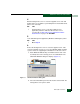
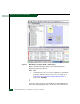
Right-click the icon representing the director reporting the problem. A
pop-up menu appears. Select the Element Manager option from the
menu. The Element Manager application opens and the Hardware
View displays. At the Hardware View:
• Observe that the Intrepid 6064 Status table is yellow and the
director status is Minor Failure or Redundant Failure.
• Inspect FRUs for a blinking red and yellow diamond (failed FRU
indicator) that overlays the FRU graphic.
Does a blinking red and yellow diamond overlay a power supply
graphic?
NO YES
↓ A power supply failure is indicated. Go to step 23 to obtain
event codes. If no event codes are found, go to MAP 0100:
Power Distribution Analysis on page 3-34. Exit MAP.
16
Does a blinking red and yellow diamond overlay a port card graphic?
NO YES
↓ A port card failure is indicated. Go to step 23 to obtain event
codes. If no event codes are found, go to MAP 0600: Port
Card Failure and Link Incident Analysis on page 3-83.
Exit MAP.