
FW 07.00.00/HAFM SW 08.06.00 McDATA Intrepid 6064 Director Installation and Service Manual (620-000108-920, April 2005)


3
MAP 0000: Start MAP
3-19
Maintenance Analysis Procedures (MAPS)
YES NO
↓ The director appears operational. Exit MAP.
Go to step 2.
20
Does a yellow triangle (attention indicator) overlay a port card
graphic?
YES NO
↓ Go to step 22.
21
Inspect the port state and LED status for all port cards with an
attention indicator.
a. Double-click the port card to open the Port Card View. At the
Port Card View, double-click the port graphic with the attention
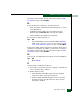
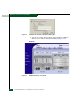
indicator. The Port Properties dialog box displays (Figure 3-5).
b. Inspect the Operational State field.
Figure 3-5 Port Properties Dialog Box
Does the Operational State field display a Segmented E_Port
message?