
FW 07.00.00/HAFM SW 08.06.00 McDATA Intrepid 6064 Director Installation and Service Manual (620-000108-920, April 2005)


3
MAP 0000: Start MAP
3-25
Maintenance Analysis Procedures (MAPS)
35
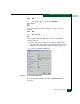
Is the green PWR OK LED on a power supply extinguished?
NO YES
↓ A power supply failure is indicated. Go to step 23 to obtain
event codes. If no event codes are found, go to MAP 0100:
Power Distribution Analysis on page 3-34. Exit MAP.
The director appears operational. Exit MAP.
36
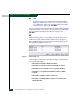
Are you at a PC with a web browser (such as Netscape Navigator or
Microsoft Internet Explorer), an Internet connection to the director
reporting the problem, and communicating with the director through
the SANpilot interface?.
YES NO
↓ Go to step 53.
37
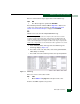
Is the web browser PC powered on and communicating with the
director through the Internet connection and SANpilot interface?
NO YES
↓ Go to step 39.
38
Boot the web browser PC.
a. Power on the PC in accordance with the instructions delivered
with the PC. The Windows desktop appears.
b. Launch the PC browser application by double-clicking the
Netscape Navigator icon or Internet Explorer icon at the
Windows desktop.
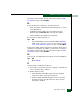
c. At the Netsite field (Netscape Navigator) or Address field
(Internet Explorer), type http://xxx.xxx.xxx.xxx, where
xxx.xxx.xxx.xxx is the IP address of the director. The
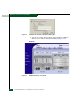
Username and Password Required dialog box appears
(Figure 3-8).