
FW 07.00.00/HAFM SW 08.06.00 McDATA Intrepid 6064 Director Installation and Service Manual (620-000108-920, April 2005)

3
MAP 0000: Start MAP
3-29
Maintenance Analysis Procedures (MAPS)
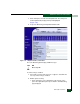
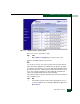
a. At the View panel, click the Port Properties tab. The View panel
(Port Properties tab) displays with port 0 highlighted
(Figure 3-10).
b. Inspect the Beaconing and Operational State fields.
Figure 3-10 SANpilot Interface, View Panel
Does the Beaconing field display an On message?
YES NO
↓ Go to step 47.
46
Port beaconing is enabled.
a. Consult the customer and next level of support to determine the
reason port beaconing is enabled.
b. Disable port beaconing:
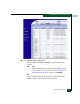
1. At the View panel, select Operations at the left side of the
panel. The Operations panel opens with the Port Beaconing
page displayed.