
FW 07.00.00/HAFM SW 08.06.00 McDATA Intrepid 6064 Director Installation and Service Manual (620-000108-920, April 2005)


3
MAP 0300: Server Application Problem Determination
3-49
Maintenance Analysis Procedures (MAPS)
Did CTP2 card replacement solve the problem?
NO YES
↓ The director appears operational. Exit MAP.
Contact the next level of support. Exit MAP.
MAP 0300: Server Application Problem Determination
This map describes isolation of management server or
customer-supplied server application problems, including problems
associated with the Windows 2000 Professional operating system,
SAN management application (EFCM or SANavigator), or Intrepid
6064 Element Manager application.
1
Did the management server or customer-supplied server lock up or
crash without displaying a warning or error message?
YES NO
↓ Go to step 4.
2
An application or operating system problem is indicated. Close the
SAN management application (at the browser-capable PC connected
through an Ethernet LAN segment to the management server).
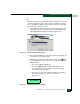
a. At the management server Windows 2000 desktop, click the
Send Ctrl-Alt-Del button at the top of the window. The Windows
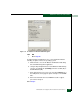
Security dialog box displays (Figure 3-13).
NOTE: Do not simultaneously press Ctrl, Alt, and Delete. This action
controls the browser-capable PC, not the rack-mount management server.